Want this done for you?
If you’ve ever managed a Shopify store with dozens of variants per product, you’ve probably faced this problem when your product page becomes cluttered with unavailable product variants. That’s why many merchants look for ways to hide out of stock variants in Shopify.
In this article, we’ll cover:
- When it makes sense to hide variants (and when it doesn’t)
- Why popular one-line CSS solutions are dangerous
- How Shopify’s variant picker actually works
- The correct JavaScript-based solution to hide out-of-stock or invalid variants safely
- Production-ready code you can use today
Why Hide Out of Stock Variants in Shopify?
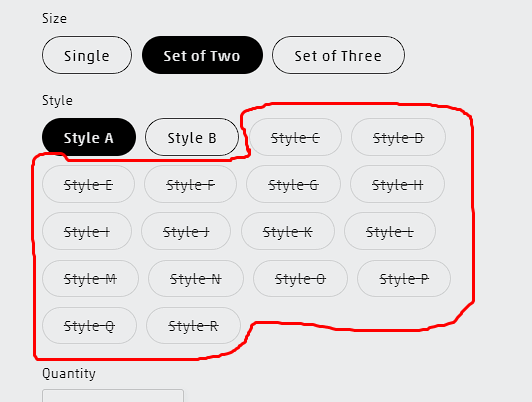
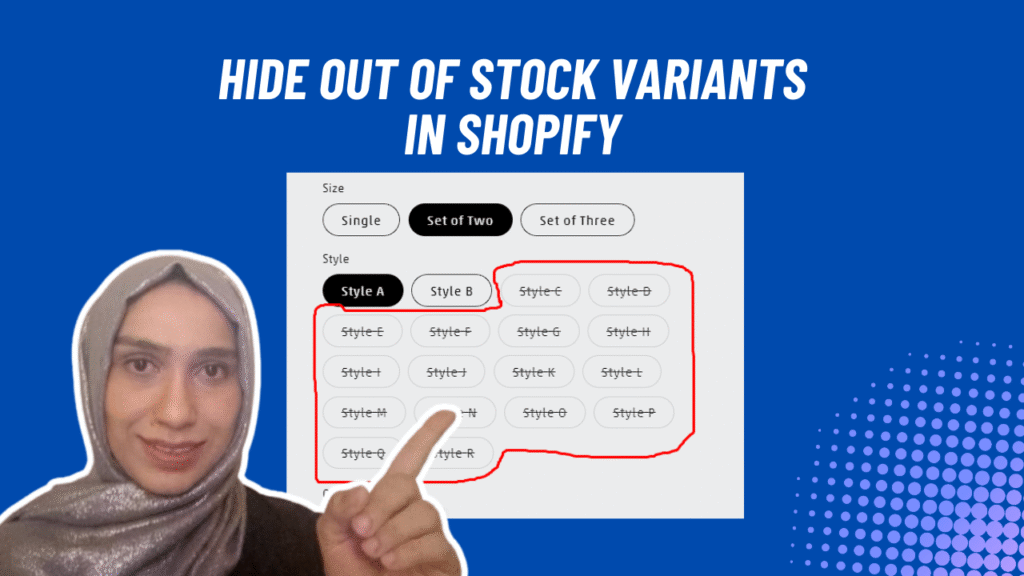
Hiding out-of-stock variants in Shopify makes the most sense for products with many possible combinations, such as color × size × material, where only a subset of variants is actually available at any given time. In these cases, showing every option can overwhelm customers, clutter the variant picker (especially on mobile), and lead to repeated selection of invalid combinations.
This is common in apparel with 30–60 size/color variants, custom products with layered options, or B2B catalogs with complex variant matrices. By hiding unavailable or invalid variants, you simplify the buying experience, guide customers toward purchasable options, and reduce friction—often resulting in better usability and higher conversion rates.
For products with fewer options, showing unavailable variants can create a sense of urgency and FOMO. And so, most small merchants leave unavailable visible but disabled on the PDP.
Anyway, in this post, we will talk about how to hide out of stock variants in Shopify and give you an easy solution.
The Real Challenge When you Hide Out of Stock Variants in Shopify
Many YouTube tutorials suggest fixing this with a simple one-line CSS rule, but that approach doesn’t actually solve the problem. CSS can only visually hide a variant — it cannot change what Shopify has selected behind the scenes. For example, imagine you’re buying a T-shirt and you select Blue / Medium. Then you switch the color to Red, where Medium is not available. A CSS-only fix may hide the “Medium” option from view, but internally Shopify still has Medium selected. As a result, variant-dependent features such as product images, prices, and availability may stop updating correctly. Your product thumbnail won’t change because the unavailable variant is still selected — it’s just hidden.
The correct approach is not only to hide unavailable options, but also to automatically select the next valid variant when a combination becomes unavailable. This ensures that Shopify updates the product image, price, URL, and add-to-cart behavior correctly. That level of control is only possible with JavaScript, which is why a JS-based solution is required to safely hide out-of-stock variants in Shopify without breaking the variant picker.
The Correct Way to Hide Out of Stock Variants in Shopify
To safely hide out-of-stock variants in Shopify, the solution needs to go beyond visual tweaks. The correct approach combines JavaScript for logic and CSS for presentation, ensuring Shopify’s variant system continues to work exactly as intended.
A reliable variant-hiding strategy follows these steps:
- Read Shopify’s variants JSON to understand which combinations actually exist
- Track the customer’s currently selected options
- Disable options that do not form a valid variant combination
- Hide disabled options using CSS (optional)
- Automatically correct invalid selections by switching to the next available variant
By doing this, you keep Shopify’s internal state consistent while improving the user experience.
This approach ensures that:
- Variant logic remains intact
- Prices, images, and availability update correctly
- AJAX carts continue to work reliably
- URLs stay in sync with the selected variant
The JavaScript Solution to Hide Out of Stock Variants in Shopify
Below is a production-ready JavaScript implementation that works with:
variant-radiosvariant-selects- Shopify Dawn-based themes and most modern Shopify themes
This script dynamically disables invalid variant combinations and automatically selects a valid option when needed.
JavaScript: Variant Filtering Logic
(() => {
  const variantSelects =
    document.querySelector("variant-selects") ||
    document.querySelector("variant-radios");

  if (!variantSelects) return;

  const productJsonEl = variantSelects.querySelector('[type="application/json"]');
  if (!productJsonEl) return;

  const variants = JSON.parse(productJsonEl.textContent);

  const isRadios = variantSelects.querySelectorAll("fieldset").length > 0;

  const groups = isRadios
    ? Array.from(variantSelects.querySelectorAll("fieldset"))
    : Array.from(variantSelects.querySelectorAll(".product-form__input--dropdown"));

  // ---- Build fast lookup maps (only AVAILABLE variants) ----
  const opt2ByOpt1 = new Map();          // key: option1 -> Set(option2)
  const opt3ByOpt1Opt2 = new Map();      // key: option1||option2 -> Set(option3)

  for (const v of variants) {
    if (!v.available) continue; // <-- inventory-aware (true "out of stock" behavior)

    if (v.option1 && v.option2) {
      if (!opt2ByOpt1.has(v.option1)) opt2ByOpt1.set(v.option1, new Set());
      opt2ByOpt1.get(v.option1).add(v.option2);
    }

    if (v.option1 && v.option2 && v.option3) {
      const key = `${v.option1}||${v.option2}`;
      if (!opt3ByOpt1Opt2.has(key)) opt3ByOpt1Opt2.set(key, new Set());
      opt3ByOpt1Opt2.get(key).add(v.option3);
    }
  }

  // ---- Helpers ----
  const getSelected = () => {
    return groups.map((g) => {
      if (isRadios) return g.querySelector("input:checked")?.value || null;
      return g.querySelector("select")?.value || null;
    });
  };

  const hideRadio = (input, hide) => {
    const label = variantSelects.querySelector(`label[for="${input.id}"]`);
    if (!label) return;
    label.style.display = hide ? "none" : "";
  };

  const hideOption = (optionEl, hide) => {
    // <option> doesn't reliably support display:none everywhere; hidden works well.
    optionEl.hidden = !!hide;
  };

  const getValidSetForLevel = (selected, level) => {
    // level 1 => validating option2 based on option1
    if (level === 1) return opt2ByOpt1.get(selected[0]) || new Set();
    // level 2 => validating option3 based on option1+option2
    if (level === 2) return opt3ByOpt1Opt2.get(`${selected[0]}||${selected[1]}`) || new Set();
    return null;
  };

  const applyForLevel = (selected, level) => {
    const validSet = getValidSetForLevel(selected, level);
    if (!validSet) return;

    const group = groups[level];

    if (isRadios) {
      const inputs = Array.from(group.querySelectorAll("input"));
      for (const input of inputs) {
        const isValid = validSet.has(input.value);
        input.disabled = !isValid;
        hideRadio(input, !isValid); // inline JS hide
      }
    } else {
      const select = group.querySelector("select");
      if (!select) return;

      const options = Array.from(select.querySelectorAll("option"));
      for (const opt of options) {
        // Keep placeholder / empty option visible if it exists
        const isPlaceholder = opt.value === "" || opt.disabled && opt.value === "";
        if (isPlaceholder) {
          hideOption(opt, false);
          continue;
        }

        const isValid = validSet.has(opt.value);
        opt.disabled = !isValid;
        hideOption(opt, !isValid); // inline JS hide
      }
    }
  };

  const autoFixInvalidSelections = () => {
    // if currently selected choice in option2/option3 is now disabled, choose first enabled
    for (let level = 1; level < groups.length; level++) {
      const group = groups[level];

      if (isRadios) {
        const checked = group.querySelector("input:checked");
        if (checked && checked.disabled) {
          const firstEnabled = group.querySelector("input:not(:disabled)");
          if (firstEnabled) firstEnabled.click(); // triggers change + Shopify updates
          return true;
        }
      } else {
        const select = group.querySelector("select");
        if (!select) continue;
        const selectedOpt = select.options[select.selectedIndex];
        if (selectedOpt && selectedOpt.disabled) {
          const firstEnabled = Array.from(select.options).find(o => !o.disabled && !o.hidden && o.value !== "");
          if (firstEnabled) {
            select.value = firstEnabled.value;
            select.dispatchEvent(new Event("change", { bubbles: true }));
          }
          return true;
        }
      }
    }
    return false;
  };

  const rebuild = () => {
    const selected = getSelected();

    // Update option2 based on option1
    if (groups.length > 1) applyForLevel(selected, 1);

    // Update option3 based on option1+option2
    // Note: re-read selected after applying level 1 (since auto-fix may happen)
    const selectedAfter2 = getSelected();
    if (groups.length > 2) applyForLevel(selectedAfter2, 2);

    // Auto-fix invalid selection if needed (and let it re-trigger rebuild via change)
    autoFixInvalidSelections();
  };

  variantSelects.addEventListener("change", rebuild);
  rebuild();
})();
While this code is written to be suitable for most stores, your case scenario could be different and may require some tweaks to the above code. If this code doesn’t work, contact me for Shopify development and I’ll make sure you get unstuck.